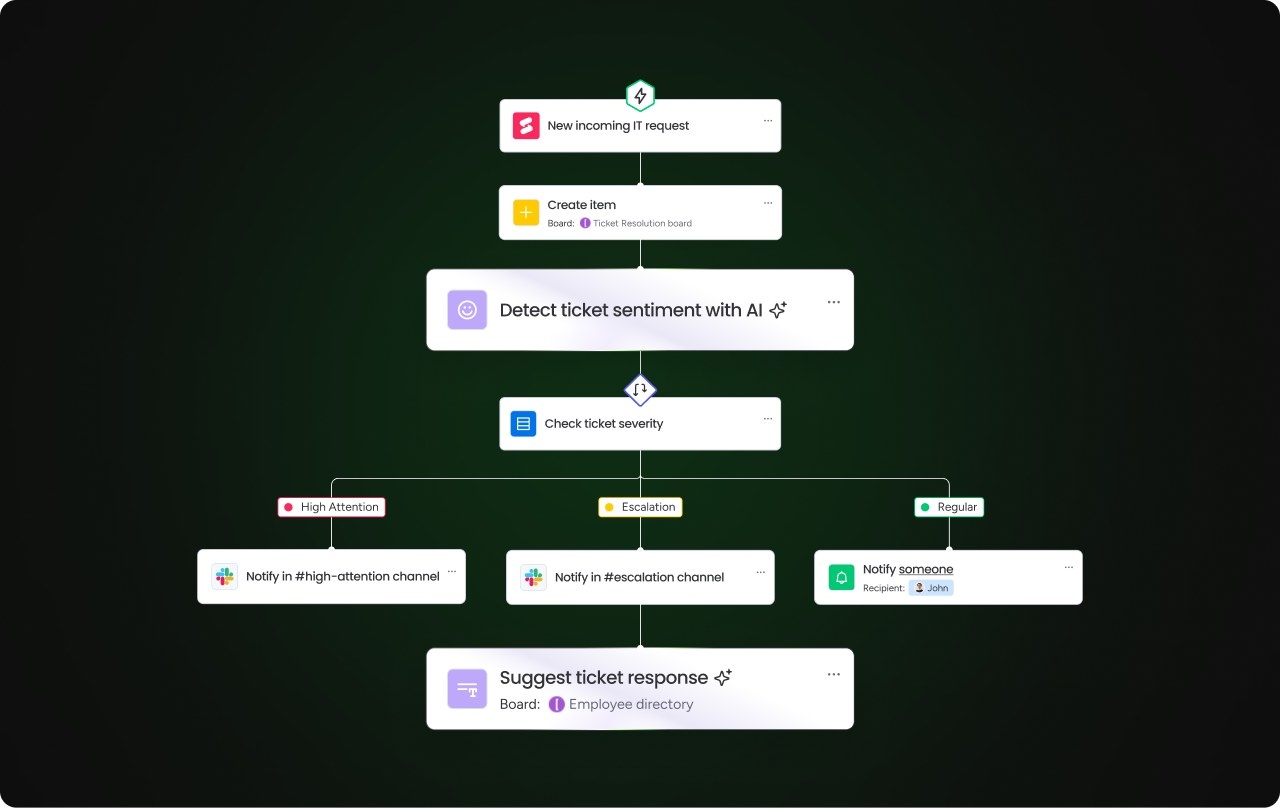
AI task managers extend beyond digital checklists: they schedule work, prioritize tasks, and support real-time collaboration while reducing manual coordination. More advanced platforms also use autonomous agents to plan and execute workflows.
This guide explains how these tools work, which capabilities to evaluate, and how seven platforms compare, including monday.com’s AI Work Platform.
Key points
- AI task managers reduce repetitive planning through automated scheduling, prioritization, and workflow execution.
- Leading platforms offer agents that act across departments rather than simply identify overdue work or recommend next steps.
- Important capabilities include autonomous execution, no-code workflow creation, shared dashboards, and connections to calendars and communication tools.
- monday.com’s AI Work Platform combines monday agents, monday vibe, monday MCP, and monday sidekick for autonomous work, no-code app development, and secure access from external AI assistants.
Understanding AI task managers
An AI task manager uses artificial intelligence to organize schedules, manage to-do lists, and prioritize workflows. By analyzing behavior, automating recurring activities, and responding to changing goals, these applications help busy professionals and teams work with less manual effort.
Core functions include:
- Scheduling tasks according to urgency and availability.
- Predicting priorities and recommending the next task.
- Learning from user behavior to refine suggestions.
- Connecting applications, inboxes, and calendars into a coordinated workflow.
Adoption is still uneven. According to monday.com’s world of work report, nearly 45% of employees at large enterprises report no AI usage. Task management offers an accessible starting point, delivering scheduling and prioritization benefits without requiring a complete digital transformation.
Where teams use AI scheduling
These tools are particularly useful when workloads move quickly and priorities change frequently. Common applications include:
- Remote and hybrid coordination: Automating schedules and progress tracking helps distributed colleagues stay focused on shared priorities.
- Cross-department resource planning: Allocating capacity across teams and projects can reduce conflicts and improve output.
- Marketing campaigns: Teams can coordinate multichannel activities, deadlines, and resources.
- Project planning: Large projects can be divided into tasks with deadlines based on dependencies, priority, and team availability.
- Calendar management: Tasks are scheduled around meetings and deadlines, with adjustments to limit conflicts.
AI tools versus traditional task management
Conventional platforms depend on people to enter, organize, and schedule work. That upkeep takes time and can leave deadlines or dependencies overlooked. AI-based tools can handle planning independently and adjust when circumstances change.
| Feature | Standard task manager | AI task manager |
|---|---|---|
| Automation level | Static, user-driven, and follows fixed rules | Dynamic and operates independently |
| Task scheduling | Manual placement | Automatic scheduling based on priority |
| Priority setting | User defined | Recommends based on deadlines and importance |
| Learning capability | Static rules | Adapts to user patterns |
| Resource allocation | Manual assignment | Smart task suggestions |
| Integration | Basic connections | Deep, contextual connections |
The result is a move from reactive maintenance toward proactive planning. Teams can concentrate on delivery while the software manages priorities and scheduling. In 2026, the most capable platforms go further, using agents to carry out actions rather than merely suggest them.
Capabilities worth evaluating
AI depth varies between products. Consider how well each platform supports the following capabilities, not simply whether it includes an AI feature.
Automatic scheduling and useful recommendations
AI schedulers place tasks into available calendar slots using deadlines and priorities. Recommendations can also reflect dependencies, importance, and working habits. Workflow automation extends this functionality by triggering status changes, reassignments, or other actions without manual input.
Shared dashboards
Collaborative dashboards bring progress, resource allocation, and performance data into one view. They help teams find bottlenecks and stay aligned in real time; stronger AI capabilities also identify patterns that would take hours to uncover manually.
Connections to existing tools
Integrations with email, calendars, communication software, and project management systems keep information centralized. This reduces data silos, manual entry, and mistakes caused by switching platforms and contexts.
Security controls
Evaluate encryption, role-based access controls, audit trails, activity logging, and compliance with standards such as SOC 2 and GDPR. Assaf Elovic, Head of AI at monday.com, argues that falling behind in AI adoption poses a greater risk than the security concerns preventing companies from adopting it.
Autonomous AI agents
Agents distinguish an advanced task manager from a scheduling assistant. They can assess project risk, assign tasks, summarize meetings, score leads, and coordinate deliverables without manual intervention, with applications across marketing, sales, IT, and HR.
Look for built-in agent builders, ready-made agent libraries, and controls for tailoring behavior to departments or workflows. In 2026, the scope of what agents can execute is a key difference between platforms.
No-code workflows and applications
Some platforms let nontechnical users describe a workflow or application in writing and generate it without developer support or costly integrations. Building tailored dashboards, trackers, and apps within the task manager lets teams fit the software to their processes.
Why teams move to AI task management
Beyond convenience, these platforms can deliver measurable improvements:
- Time savings: Automating reminders, updates, and scheduling reduces weekly administrative work.
- Fewer errors: AI can identify conflicting schedules and dependencies before they delay delivery.
- Clearer priorities: Data and deadlines guide the work queue rather than intuition alone.
- Greater capacity: Agents can take on work that might otherwise require more staff.
- Earlier risk detection: Teams can address blockers before they become larger problems.
For example, teams using monday.com’s AI Work Platform save 3,564 hours annually through effective resource allocation, freeing that time for higher-impact work.
Comparison criteria
The comparison considers five dimensions, with no single factor determining the ranking:
- AI sophistication: Automation depth, agent functionality, and the ability to learn over time.
- Feature coverage: Scheduling, prioritization, dashboards, and integrations.
- Ease of adoption: How readily teams can start without technical expertise.
- Cost and access: Free options and the value offered by paid plans.
- User feedback: G2 ratings and verified customer reviews.
Seven AI task managers compared
The table provides a quick overview, followed by each platform’s strengths, features, pricing, and user feedback.
| Platform | Best for | Starting price | Free trial | G2 rating |
|---|---|---|---|---|
| monday work management | Teams needing a scalable platform to automate projects, tasks, and workflows | Free plan, paid from $9/seat/month | 14 days | 4.7/5 (G2) |
| Motion | Professionals who value hands-off scheduling | From $19/seat/month | 7 days | 4.1/5 (G2) |
| Taskade | Teams that prioritize AI agent integration | Free plan, paid from $10/month | 7 days | 4.5/5 (G2) |
| ClickUp | Teams looking for a simple platform with automation | Free plan, paid from $7/user/month | 14 days | 4.7/5 (G2) |
| Todoist | Individuals and small teams seeking a simple, intuitive task manager | Free, plan paid from $4/user/month | 14 days | 4.4/5 (G2) |
| TimeHero | Professionals seeking to optimize their time with smart planning and forecasting | From $4.60/user/month | 7 days | 4.5/5 (G2) |
| Notion | Teams combining documentation and task management | Free plan, paid from $10/member/month | 30 days (Notion AI) | 4.7/5 (G2) |
1. monday.com’s AI Work Platform
Best suited to: Teams seeking a scalable, AI-native system for project automation, agent coordination, and work delivery.
monday.com’s AI Work Platform connects people and AI agents, supporting everything from individual tasks to cross-department autonomous workflows. Teams can begin with simpler processes and expand as their AI capabilities develop, using customizable templates, intelligent automation, real-time insights, and enterprise-level security.
Notable capabilities
- monday sidekick: An embedded, context-aware assistant that uses organizational data, workflow context, and history to produce content, analyze information, recommend actions, and execute work.
- monday agents: Ready-made agents include Project Analyzer, Meeting Summarizer, Risk Analyzer, and Lead Scorer. Teams can also create custom agents from prompts with Agent Builder. Agents operate across departments 24/7.
- monday vibe: A no-code AI builder that generates functional business apps from written prompts, including dashboards, trackers, planners, and chatbots.
- monday MCP: Uses the open Model Context Protocol standard to connect the workspace with AI assistants such as Claude, ChatGPT, Copilot, and Gemini. It is included on all plans at no extra cost.
- No-code AI automation: Triggers and conditions handle recurring work without programming.
- Visual AI dashboards: Surface live insights, bottlenecks, and progress.
Cost and trial options
- Paid plans start at $9/seat/month.
- A free forever plan is available.
- A free 14-day trial is offered.
User feedback
G2 rating: 4.7/5
Walter C. values automated notifications and status updates, integrations with services such as Slack and Google Drive, and the choice of Table, Gantt, and Calendar views for different needs.
2. Motion
Best suited to: Professionals who prefer scheduling with minimal manual involvement.
Motion brings tasks, calendar scheduling, and project planning together. Its AI organizes the day, establishes priorities, and revises schedules as meetings or deadlines change, reducing ongoing manual adjustments.
Notable capabilities
- AI-based task scheduling and prioritization.
- Live calendar optimization and conflict resolution.
- Integrated project and task management with smart reminders.
Cost and trial options
- Paid plans start at $19/seat/month.
- A free 7-day trial is offered.
User feedback
G2 rating: 4.1/5
A verified user describes Motion as a daily companion that saves time by deciding when to tackle tasks, reducing the planning burden of a detail-heavy workload.
3. Taskade
Best suited to: Teams that place a high priority on integrated AI agents.
Taskade combines communication, projects, and tasks in a shared workspace. AI-generated task suggestions, automated workflows, and project-specific templates help teams move work forward.
Notable capabilities
- AI recommendations and templates for faster project planning.
- Live collaboration with integrated video chat.
- AI agents that act on ideas.
Cost and trial options
- Paid plans start at $10/month.
- A free forever plan is available.
- A free 7-day trial is offered.
User feedback
G2 rating: 4.5/5
Mundo S. considers the agents and automation especially valuable, describing access to a personal AI team as a major change in how work gets done.
4. ClickUp
Best suited to: Teams wanting a straightforward platform with automation.
ClickUp offers a customizable workspace for tasks, projects, and goals. AI prioritization and smart reminders reduce manual effort while helping teams remain aligned and on schedule.
Notable capabilities
- AI reminders and prioritization informed by deadlines and activity.
- An AI meeting note taker that summarizes discussions and creates tasks immediately.
- Goal and time tracking, plus built-in templates to simplify setup.
Cost and trial options
- Paid plans start at $7/user/month.
- A free forever plan is available.
- A free 14-day trial is offered.
User feedback
G2 rating: 4.7/5
Md Kamrul H. appreciates ClickUp’s broad, unified approach, reporting that their company centralized task management, project timelines, and internal communication there.
5. Todoist
Best suited to: Individuals and small teams looking for intuitive task management.
Todoist emphasizes easy organization. Its AI and smart features suggest tasks, organize email, and help determine when work should be completed.
Notable capabilities
- AI Assist generates task suggestions for workflows.
- Natural language input makes task creation quick.
- 50+ personal and professional templates support faster setup.
Cost and trial options
- Paid plans start at $4/user/month.
- A free forever plan is available.
- A free 14-day trial is offered.
User feedback
G2 rating: 4.4/5
Afsara N. reports an easy setup experience and finds Todoist helpful for turning work into clear lists, including large team projects.
6. TimeHero
Best suited to: Professionals who want smarter planning and forecasting to make better use of their time.
TimeHero combines task management, scheduling, time tracking, and AI forecasting. It places tasks around calendar events and deadlines so users can manage projects without manually planning every activity.
Notable capabilities
- Predictive scheduling selects suitable times for tasks.
- Adaptive planning accounts for availability and deadlines.
- Built-in time tracking and timesheets record hours.
Cost and trial options
- Paid plans start at $4.60/user/month.
- A free 7-day trial is offered.
User feedback
G2 rating: 4.5/5
A verified user says TimeHero resolved difficulty choosing between competing tasks by organizing a daily timetable and making immediate priorities clearer.
7. Notion
Best suited to: Teams managing documentation alongside tasks.
Notion combines notes, wikis, and project management. AI writing suggestions, generated summaries, and collaborative documentation tools help users create and organize information more efficiently.
Notable capabilities
- AI writing support and content suggestions for notes and documentation.
- Adaptable databases, templates, and task boards.
- AI search for finding documents, links, and notes across the platform.
Cost and trial options
- Paid plans start at $10/member/month.
- A free forever plan is available.
- Some plans include a free 30-day trial of Notion AI.
User feedback
G2 rating: 4.7/5
Reena W. praises Notion’s flexibility for organizing information, collaborating, and creating workflows without code. Their daily uses range from product specifications and meeting notes to project tracking and team dashboards.
Choosing a platform for your team
Match the product to your current working methods and the level of AI support you expect to need. Consider these factors before committing:
- Team size and structure: A tool suitable for a 5-person startup may not serve a 500-person enterprise. Assess collaboration, reporting, permissions, and cross-department visibility as the organization grows.
- Integration needs: Check compatibility with email, calendars, communication tools, and specialist software. Deep, bidirectional connections help information flow without constant context switching.
- Required AI depth: Decide whether reminders and scheduling are sufficient or whether you need predictive priorities, natural language workflows, and autonomous agents.
- Budget: Compare free and paid options against actual requirements. Free plans often cover core features, while AI may require a paid tier. Weigh the cost against the time saved.
- Automation complexity: Distinguish simple if-then rules from adaptive, multistep workflows. Also check whether builders require technical skills or accept plain-language prompts.
- Security: Assess encryption, role-based permissions, SOC 2 and GDPR compliance, and audit logging, especially when handling sensitive financial or client information.
- Agent readiness: Check whether autonomous agents can operate across departments. Teams expecting to adopt agentic workflows within 12 to 18 months should consider whether limited automation could force a costly migration later.
Where monday.com’s AI Work Platform stands out
Task managers share a goal of simplifying coordination, but their customization and automation depth differ. monday.com’s AI Work Platform supports complex workflows through agents, intelligent automation, and real-time insights, while maintaining enterprise security and compliance as teams scale.
No-code automation for routine coordination
Teams can configure triggers and conditions to assign work after a status change or send reminders before deadlines. These AI-powered workflows reduce recurring updates and allow more attention to delivery.
Dashboards that support decisions
Visual dashboards bring together current data, trends, and actionable insights. AI identifies bottlenecks, highlights overdue items, and suggests process improvements, giving managers a clearer view of project health.
Predictive planning and prioritization
Priorities reflect urgency, dependencies, and resource availability. Forecasting and predictive analytics let teams compare projected tasks and projects with actual outcomes, find performance gaps, revise timelines, and improve resource allocation and future planning.
Calendar connections
More than 200 app integrations include Google Calendar and Outlook. Teams can sync information between applications and calendars, automatically map work to external calendars, and use AI-enhanced scheduling to reduce conflicts.
monday agents for autonomous execution
monday agents plan, coordinate, and carry out work rather than only flagging problems. Ready-made options include Project Analyzer, Meeting Summarizer, Risk Analyzer, Lead Scorer, and Ticket Assignment. Agent Builder also lets users describe a goal in a prompt to create a custom agent.
Agents draw on context across marketing, sales, operations, HR, and IT, allowing actions and recommendations to account for connected work beyond a single board. Customers using monday agents save 98+ hours of manual work with AI.
monday vibe for tailored business apps
With monday vibe, a plain-language description can become a functional, enterprise-secure application without a developer. Examples include dashboards, time trackers, project planners, AI insight dashboards, and chatbots.
Available on all paid plans, vibe produces mobile-ready apps that inherit the platform’s permissions and security framework, helping teams build tools around their actual processes.
monday MCP for external AI assistants
The open Model Context Protocol (MCP) lets assistants such as Claude, ChatGPT, Microsoft Copilot, and Gemini connect securely to a monday.com workspace. Users can ask an assistant to create an item, retrieve project status, or identify overdue work without opening the monday interface.
monday MCP is included on all plans at no additional cost. OAuth-based security and existing account permissions govern access.
Frequently asked questions
What does AI do in task management software?
AI automates and improves task workflows by setting priorities, suggesting deadlines, scheduling work, and adapting to user habits. Less manual input gives individuals and teams more time for higher-value activities.
Which option suits small teams?
monday.com’s AI Work Platform is a strong option for small teams because it combines an intuitive interface with automation and room to grow. Custom workflows, live dashboards, and AI task suggestions support changing needs without a steep learning curve.
Which AI task manager is best overall?
The answer depends on team size and the autonomy required. For agents that plan and execute work, monday.com’s AI Work Platform offers the most comprehensive feature set, including monday agents, monday vibe, and monday MCP. Motion is a strong choice for individual scheduling, while ClickUp and Todoist offer accessible starting points for teams prioritizing simplicity.
Do these tools connect with Google Calendar and Outlook?
Most AI task managers integrate with both. Syncing tasks, availability, meetings, and deadlines keeps schedules current, while calendar-based assistants help reduce conflicts across platforms.
How is sensitive business information protected?
Protection commonly includes encryption, role-based access, compliance certifications, and regular security audits. monday.com’s AI Work Platform, for example, provides enterprise-grade encryption, SOC 2 compliance, role-based controls, and audit logs.
Is setup difficult?
Many AI task managers are designed for quick adoption without technical expertise or lengthy onboarding. monday.com’s AI Work Platform, for example, provides no-code automation and customizable templates.
How do recommendations improve over time?
Machine learning analyzes behavior, preferences, and deadlines. As working patterns become clearer, the system can refine scheduling, priorities, and task suggestions.
Can AI handle tasks automatically?
Yes. Depending on the platform, AI can schedule work, assign items, issue reminders, detect conflicts, and execute multistep agent workflows. monday.com’s AI Work Platform also supports agents that monitor project health, identify risks, and act before problems escalate. Other tools may be limited to basic scheduling.
Are free AI task managers available?
monday.com’s AI Work Platform, ClickUp, Todoist, Notion, and Taskade offer free plans. These generally cover core project management, with AI capabilities often reserved for paid tiers. monday.com’s AI Work Platform includes a free forever plan with unlimited boards and basic automations, plus a 14-day trial of paid features, making it one of the more capable free choices for small teams.